DNS
Oracle AI Database@Azure uses DNS names for database connections and service endpoints.
This page explains the domain names used by each service, the default and custom DNS choices for Exadata VM clusters, the custom endpoint option for Oracle GoldenGate, how clients in Azure and connected on-premises networks resolve service names, and how Oracle AI Database@Azure resources resolve names in Azure and on-premises networks.
DNS resolution returns an address for a name. Clients also need a network route and the appropriate security rules to connect to that address.
A fully qualified domain name (FQDN) is the complete DNS name used to identify a database host or service endpoint. It combines the host or endpoint label with its domain name. For example, in oradb-abcde-scan.db.example.com, oradb-abcde-scan is the endpoint label, db.example.com is the domain name, and the complete value is the FQDN.
On this page, "Custom DNS" refers to the Exadata provisioning option that selects a custom OCI private zone. A private zone contains DNS records, such as mappings between hostnames and private IP addresses, that are available within associated private networks rather than through public DNS. A "customer-managed DNS service" is a DNS resolver operated by the customer, such as Azure DNS Private Resolver, BIND, or an enterprise DNS platform such as Infoblox.
Domain Names by Service
Compare the domain names and custom DNS options for each service.
| Service | Default domain | Customer-defined DNS name |
|---|---|---|
| Oracle Exadata Database Service on Dedicated Infrastructure |
oraclevcn.com
|
Supported for Exadata VM clusters |
| Oracle Exadata Database Service on Exascale Infrastructure |
oraclevcn.com
|
Not supported |
| Oracle Autonomous AI Database on Dedicated Exadata Infrastructure |
oraclevcn.com
|
Not supported |
| Autonomous AI Database Serverless |
oraclecloud.com for database endpoints; oraclecloudapps.com for application and tool endpoints |
Not supported |
| Oracle Base Database Service |
oraclevcn.com
|
Not supported |
| Oracle GoldenGate | Service-provided deployment console URL | Supported as a customized deployment console endpoint |
Plan the DNS Namespace and Resolution Path
Plan the database domain name and its DNS resolution path before provisioning.
Decide which DNS service resolves the domain and how queries reach it.
A customer-managed DNS service can resolve database names in either of these ways:
- Host and maintain a copy of the database DNS records in a customer-managed zone.
- Conditionally forward the database domain to a DNS listening endpoint so that the DNS service resolves the records in its private zones.
When you use conditional forwarding, create a forwarding rule for the database domain name and send matching queries to the listening endpoint that can resolve it.
A Network Anchor is an Oracle AI Database@Azure resource that defines the network mapping used by supported database resources. You create it in Azure for a specific region and availability zone by selecting a VNet and delegated subnet. Oracle AI Database@Azure maps that network to the corresponding VCN, subnet, and DNS resolver configuration in the service network. Database resources associated with the Network Anchor use this network and DNS mapping.
When DNS listening is enabled, the Network Anchor exposes its own listening endpoint. The endpoint sends queries to the DNS resolver for the Network Anchor, which resolves records from the private zones available to that resolver. Each database domain must therefore map to the listening endpoint whose resolver can answer for every record in that domain. This makes the delegated-domain design important.
This design is particularly important when you use conditional forwarding. Plan a distinct database domain for each Network Anchor or availability-zone deployment, whether the domain is customer-defined, such as az1.eastus.db.example.com, or Oracle-managed, such as ocidbsubnet.ociexamplevnet.oraclevcn.com. Forward the complete database domain rather than its parent domain, such as example.com or oraclevcn.com. Each database domain must map to a listening endpoint that can answer for all its records.
If the customer-managed DNS service hosts and maintains a complete copy of the database records, it answers the DNS queries directly.
For information about the zonal scope, mapped network resources, and functions of a Network Anchor, see Anchor Design for Oracle AI Database@Azure . For the available DNS options and provisioning steps, see Create a Network Anchor.
Exadata Database Service Considerations
An Exadata VM cluster can use the default oraclevcn.com domain or a custom domain such as example.com.
Choose the domain during cluster creation.
Names Used During Provisioning
During Exadata VM cluster provisioning, you provide a host name prefix.
The service appends a generated five-character suffix to create the VM cluster hostname base. A node number is added to individual node hostnames. After provisioning, use the complete FQDNs shown in the database connection details.
The Azure resource name, OCI cluster name, hostname prefix, generated hostname, and SCAN name are different values:
| Value | Example | Purpose and uniqueness |
|---|---|---|
| Azure VM cluster resource name |
vmcluster1
|
Identifies the VM cluster resource in Azure and must be unique within the Azure subscription. It is separate from the OCI cluster name, host name prefix, and generated database hostnames, and it doesn't determine the database DNS names. |
| OCI cluster name |
cluster1
|
Identifies the underlying Exadata cluster. If you provide it, it can contain no more than 11 characters. It doesn't determine the database DNS names. If you omit it, the service generates a value. |
| Host name prefix |
oradb
|
Customer-provided first portion of the hostname. |
| Generated VM cluster hostname base |
oradb-abcde
|
Combines the prefix and a service-generated five-character suffix. |
| Generated node hostname |
oradb-abcde1
|
Adds the node number to the generated hostname base. The resulting hostname must be unique within the subnet. |
| SCAN FQDN with custom DNS |
oradb-abcde-scan.db.example.com
|
Client connection name generated in the selected custom private zone. |
| SCAN FQDN with default DNS |
oradb-abcde-scan.<subnet-domain-label>.<vcn-domain-label>.oraclevcn.com
|
Client connection name generated in the default domain derived from the delegated subnet and VNet. |
Default DNS
Use the Oracle-managed oraclevcn.com domain when you don't require an organization-owned domain.
Oracle creates the cluster's DNS records during provisioning. The cluster's SCAN name uses the assigned oraclevcn.com FQDN.
How the Default Domain Is Derived
With default DNS, the domain is derived from the delegated subnet and VNet names, whether the deployment uses a Network Anchor or selects the VNet and delegated subnet directly.
Oracle AI Database@Azure generates each label by using the oci prefix followed by the first 11 normalized characters of the corresponding Azure name:
oci<first-11-characters-of-delegated-subnet>.oci<first-11-characters-of-vnet>.oraclevcn.comHyphens, underscores, and periods are removed during label generation. The first 11 characters are taken after this normalization.
For example:
| Component | Value |
|---|---|
| Azure VNet |
example-vnet
|
| Delegated subnet |
dbsubnet
|
| Generated subnet DNS label |
ocidbsubnet
|
| Default domain |
ocidbsubnet.ociexamplevnet.oraclevcn.com
|
| Host name prefix |
oradb
|
| Generated VM cluster hostname base |
oradb-abcde
|
| Generated node hostname |
oradb-abcde1
|
| Generated SCAN FQDN |
oradb-abcde-scan.ocidbsubnet.ociexamplevnet.oraclevcn.com
|
Prevent Default-Domain Overlap
Azure VNet and delegated subnet names are normalized and can be shortened when DNS domains are generated.
Long, similar VNet and delegated subnet names can therefore produce identical or overlapping oraclevcn.com domains.
Select VNet and delegated subnet names whose first 11 normalized characters distinguish the deployment, region, or availability zone. Put multiple distinguishing characters near the beginning of each name because characters beyond that limit don't appear in the generated DNS labels. For example, oradb-production-eastus and oradb-production-westus both begin with the normalized value oradbproduc. Names such as eus1-oradb-production and wus1-oradb-production preserve the regional identifier in the generated labels.
The Exadata Host name prefix affects the generated host and SCAN names, but it doesn't affect the generated domain or its forwarding path.
Before provisioning, check that the first 11 normalized characters of the selected VNet and delegated subnet names don't duplicate the corresponding values for another deployment. Then verify each generated Host domain name and SCAN FQDN after provisioning. Forward the complete generated domain, such as ocidbsubnet.ociexamplevnet.oraclevcn.com, to the endpoint that serves all its records. If domains overlap, use distinct custom subdomains or a central DNS authority.
A database node name follows this general structure:
<hostname-prefix>-<generated-string><node-number>.<subnet-domain-label>.<vcn-domain-label>.oraclevcn.comThe service adds the generated node suffix so that each node has a distinct name. Applications typically connect by using the SCAN name or another FQDN supplied in the database connection details. The DNS resolver resolves the node names and returns the SCAN virtual IP addresses for the SCAN name.
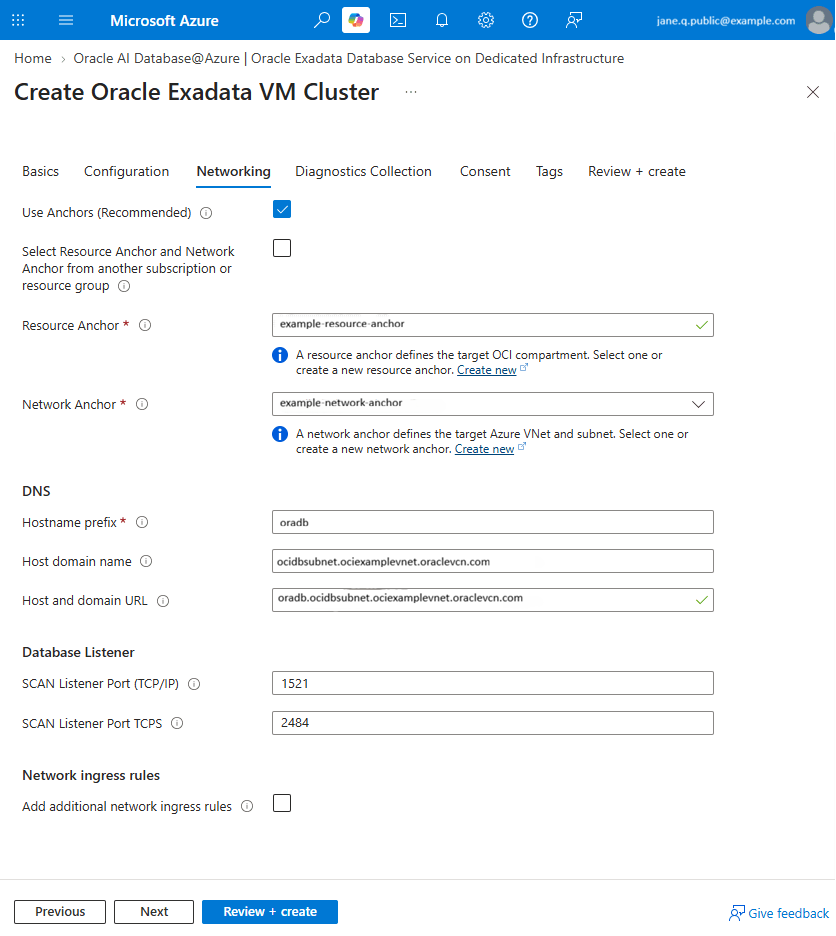
In the Azure portal, start the Exadata VM cluster creation flow, leave Custom DNS unselected, and provide a Host name prefix, such as oradb. If you use resource and network anchors, select them in the flow. Check the generated Host domain name and Host and domain URL before creating the cluster.
Custom DNS
Use a custom domain when the Exadata VM cluster must use your organization's namespace, such as db.example.com.
Plan the Custom DNS Namespace
Choose the custom domain and its Network Anchor before provisioning.
Use a distinct delegated subdomain for each Network Anchor or availability-zone deployment, such as az1.eastus.db.example.com. Each suffix must lead to an endpoint that can resolve every record in that zone.
Create and Associate the Private View
A custom domain is stored in an OCI private DNS zone that belongs to a private view.
Create the private view and zone in the OCI compartment whose name matches the Azure subscription ID. This makes the view available to the Oracle AI Database@Azure provisioning flow for that subscription. Associate the private view with the DNS resolver for the Network Anchor to make the custom zone visible to that resolver and to the Network Anchor DNS listening endpoint.
The DNS resolver for the Network Anchor is in a child compartment under the subscription compartment. This child compartment is created for the Resource Anchor and contains the VCN and resolver used by the Network Anchor.
The compartment and attachment relationship has the following form:
OCI tenancy root: <tenancy-name>
`-- Multicloud link base compartment
    |   Name: MulticloudLink_ODBAA_<timestamp>
    `-- Azure subscription compartment
        |   Name: <azure-subscription-id>
        |
        |-- [1] Private view: <custom-private-view>
        |       `-- Private zone: az1.eastus.db.example.com
        |
        `-- Child Resource Anchor compartment
            |   Name: <resource-group>_<resource-anchor>_<timestamp>
            `-- VCN created for the Network Anchor
                |   Name: VCN-<network-anchor>-<timestamp>
                `-- DNS resolver
                    |-- Attached private view: [1]
                    `-- DNS listening endpoint
Complete these steps before creating the Exadata VM cluster:
- In the OCI Console, select the region used by the Network Anchor.
- Go to Networking > DNS Management > Private Views.
- Select the compartment whose name matches the Azure subscription ID in which you'll create the VM cluster.
- Create a private view for the custom namespace, or select an existing private view in that compartment.
-
In that private view, create a private DNS zone for the custom domain, such as
az1.eastus.db.example.com. - Go to Networking > DNS Management > Private Resolvers.
- Select the child Resource Anchor compartment that contains the Network Anchor's VCN and DNS resolver.
- Select the resolver for the Network Anchor, and attach the private view created in the subscription compartment.
- Verify that the private view appears in the resolver's list of attached views before provisioning the cluster.
A private view can contain multiple private zones and can be associated with multiple VCN resolvers. You can use a distinct zone for each resolution path while sharing the view with every VCN that must resolve those zones.
The resolver evaluates a matching private zone before a forwarding rule. If the zone exists but doesn't contain the requested record, resolution can end with an NXDOMAIN response instead of forwarding the query. Don't create a broad or overlapping private zone unless it can answer for every required name below that suffix.
Select the Custom DNS Configuration During Provisioning
Then create the cluster in the Azure portal:
Network Anchor and Custom DNS can be used together.
-
Enter the Host name prefix and review the generated host and domain name.
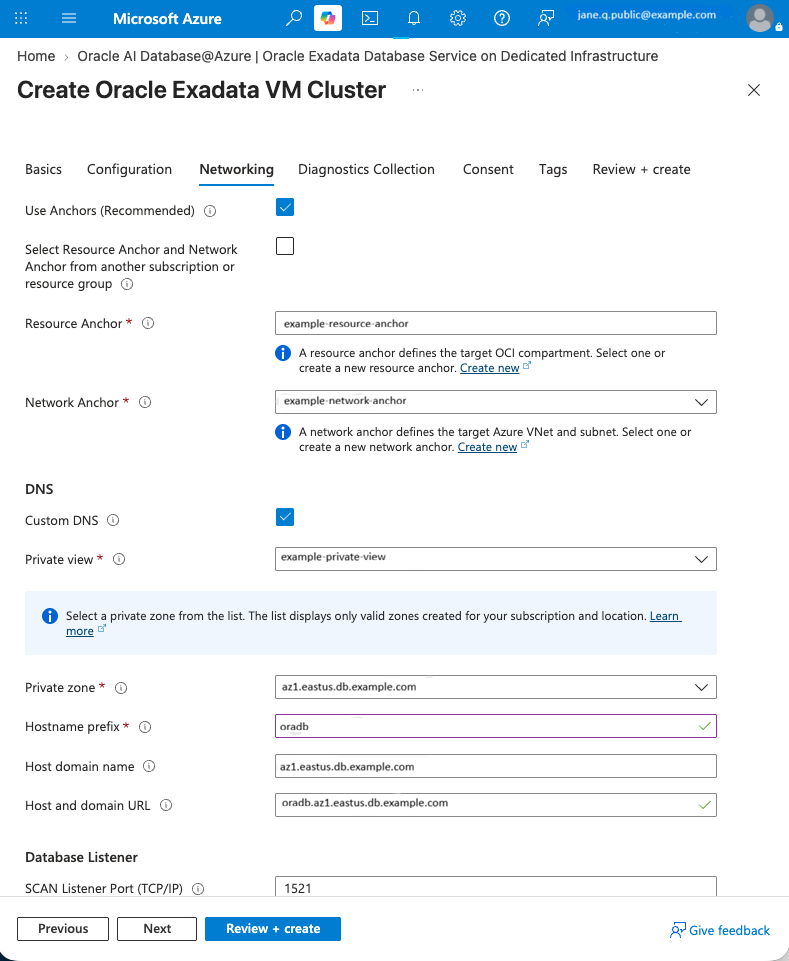
During provisioning, Oracle AI Database@Azure creates the database records in the selected private zone.
The Exadata VM cluster creation procedure describes the Custom DNS and Use Anchors (Recommended) selections. For OCI private views, see Attach a private view to a resolver.
Exadata Database Service DNS Limitations
Review the naming limits for Exadata VM clusters and custom DNS zones.
| Limitation | Scope | Description |
|---|---|---|
| OCI cluster name | Exadata VM cluster provisioning | Maximum 11 characters. It must begin with a letter, can contain letters, numbers, and hyphens, and isn't case-sensitive. Underscores aren't permitted. This value is separate from the Azure VM cluster resource name and the DNS hostname prefix. |
| Exadata hostname prefix | Exadata VM cluster provisioning | Maximum 23 characters. Must start with a letter and end with a letter or number. It can contain letters, numbers, and hyphens. Don't use localhost or a value containing -version. The service adds a five-character suffix. |
| Exadata host and domain name | Exadata VM cluster provisioning | Maximum 112 characters for the complete FQDN formed from the service-generated hostname, including the customer-provided prefix, and the domain name. This product limit is stricter than the DNS protocol maximum. The resulting hostnames and FQDNs must be unique within the subnet. |
| OCI private DNS zone name | Custom DNS zone | Maximum 254 characters, with a maximum of 63 octets for each DNS label. When the zone is used by an Exadata VM cluster, the 112-character Exadata FQDN limit is more restrictive. |
Autonomous AI Database Serverless DNS
Autonomous AI Database Serverless uses FQDNs for its private database and application endpoints.
The endpoint names contain a service-generated label and the OCI parent region. An endpoint name can also contain the Azure region. Both FQDN structures are valid and can coexist across deployments:
<private-endpoint-label>.adb.<oci-region>.oraclecloud.com
<private-endpoint-label>.adb.<oci-region>.oraclecloudapps.com

<private-endpoint-label>.azure-<azure-region>.adb.<oci-region>.oraclecloud.com
<private-endpoint-label>.azure-<azure-region>.adb.<oci-region>.oraclecloudapps.com
For example, instance adbsdemo01 in Azure France Central uses the FQDN structure without the Azure region label:
aogabjrt.adb.eu-paris-1.oraclecloud.com
aogabjrt.adb.eu-paris-1.oraclecloudapps.com
Instance adbsdnsuse01 in Azure East US uses the Azure-qualified FQDN structure:
g6rcr4ba.azure-eastus.adb.us-ashburn-1.oraclecloud.com
g6rcr4ba.azure-eastus.adb.us-ashburn-1.oraclecloudapps.com
Existing Endpoint Names
Existing databases retain the endpoint names assigned during provisioning, including names that don't contain the Azure region label.
Continue to use the endpoint names supplied in the database details and client credentials.
Azure Private DNS Zones
For a private endpoint, the service creates two Azure Private DNS zones in the resource group that contains the VNet selected during provisioning.
This resource group can differ from the resource group that contains the Autonomous Database resource. One zone is named for the exact database endpoint under oraclecloud.com, and the other is named for the exact application endpoint under oraclecloudapps.com. Each zone contains an apex A record for the database private IP address and is linked to the selected VNet.
Link both zones to every additional VNet whose clients or DNS resolvers must resolve the endpoint names. The zones and an additional linked VNet don't need to be in the same resource group; DNS resolution depends on the VNet link. However, a VNet can't be linked to multiple Private DNS zone resources with the same or overlapping namespace, even when those zones are in different resource groups or subscriptions. If a VNet is already linked to another zone for the same namespace, consolidate the required records into one zone or use DNS forwarding instead.
DNS Forwarding
For clients outside the linked VNets, configure a DNS path to a resolver that can resolve both service-created Azure Private DNS zones.
This requirement can apply to clients in on-premises networks, other Azure VNets, or other clouds.
Oracle GoldenGate DNS
Oracle GoldenGate supports a customized endpoint for its deployment console.
When you create or edit a deployment, you can provide a private FQDN and, optionally, its matching SSL/TLS certificate and private key. You're responsible for creating the DNS record that resolves the FQDN to the deployment's private IP address and for making that record resolvable from the networks that access the console.
This custom endpoint is separate from the Exadata VM cluster Custom DNS option. It changes the name used to access the GoldenGate deployment console; it doesn't select the private DNS zone for database host or SCAN records. GoldenGate must also be able to resolve the FQDNs of its source and target databases.
See Create data replication resources for the Customize endpoint option.
DNS Resolution for Oracle AI Database@Azure
Oracle AI Database@Azure resources use OCI DNS for name resolution.
OCI DNS resolves records in the private zones and views available to the resource's VCN resolver. It can also conditionally forward queries for Azure or on-premises domains through a DNS forwarding endpoint. Azure and on-premises clients can resolve database names by forwarding queries to a DNS listening endpoint or by using a replicated private zone in Azure.
Whether clients run in Azure, OCI, or a connected on-premises network, their DNS service must be able to resolve the complete database domain. Make the database private zone available to the client resolver, or conditionally forward the database domain to a resolver endpoint that can answer for all its records. Azure clients can also use a replicated copy of the database private zone. Configure the reverse query direction separately when database resources must resolve names in client networks.
Network anchors can provide a DNS listening endpoint, a forwarding endpoint, or private-zone replication. Select the option based on where the DNS query starts and which names the client must resolve.
| Query starts in | Option | Resolution path |
|---|---|---|
| Azure, with a copy of the database private zone | Replicate DNS Private zones during DB creation | Database private DNS records are copied to Azure so linked Azure networks can resolve them locally. |
| Azure or a connected on-premises network | Create DNS Listening Endpoint | Azure or on-premises DNS forwards queries for Oracle AI Database@Azure service names to the service's DNS listening endpoint. |
| An Oracle AI Database@Azure resource | Create DNS Forwarding Endpoint | The service resolver forwards queries for selected Azure or on-premises domains to the target DNS resolver. |
The listening endpoint and private-zone replication provide overlapping ways for Azure clients to resolve Oracle AI Database@Azure database names. Choose one according to your DNS design. Configure both query directions when database resources must resolve Azure or on-premises names and clients in those networks must resolve database names.
Private-Zone Replication
Use Replicate DNS Private zones during DB creation when a copy of the database private zone in Azure fits the design.
During database creation, the service creates an Azure Private DNS zone in the subscription that contains the deployment and links it to the VNet mapped by the Network Anchor. If a central Azure DNS resolver is in another VNet, link the replicated zone to that DNS hub VNet. Client VNets that send their DNS queries through the hub resolver don't need direct links to the zone.
A VNet can't be linked to multiple Private DNS zone resources with the same or overlapping namespace. If replicated zones from different deployments use the same namespace, consolidate their records into one zone for the DNS hub or use conditional forwarding to the listening endpoint that serves each database domain.
For environments with multiple VNets, connected on-premises networks, or centralized DNS, prefer conditional forwarding to the Network Anchor listening endpoint. Forwarding keeps one DNS authority and avoids managing replicated zones and VNet links. Replication remains suitable when clients can resolve the copied zone through a small number of linked Azure VNets.
Conditional Forwarding
Create a DNS listening endpoint and configure the client DNS service to forward the complete database domain to the endpoint that can resolve it.
Reference Architecture
The following reference architecture diagram shows DNS resolution through a Network Anchor.
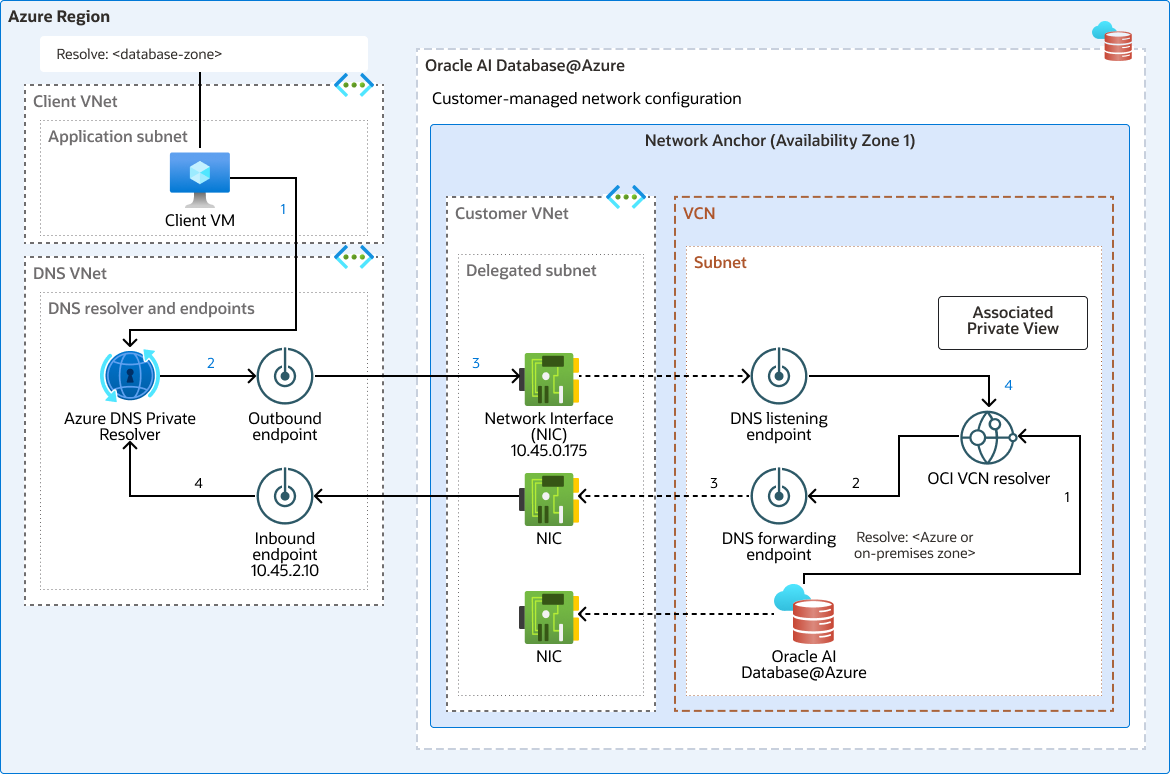
The Network Anchor groups the delegated subnet, vNICs, database resource, and DNS endpoints. DNS queries use UDP or TCP port 53, and responses return through the corresponding query path.
The diagram shows two independent DNS query paths. The upper path resolves an Oracle AI Database@Azure database name for a client in Azure. In the lower path, a database resource resolves a name hosted in Azure or an on-premises network.
Resolve a Database Name from Azure
Azure clients can resolve database names through a network anchor DNS listening endpoint.
- The client VM sends a query for the database FQDN to its configured DNS service.
- The Azure DNS Private Resolver forwarding ruleset matches the database domain. In the diagram, the rule for
<database-domain>targets the Network Anchor DNS listening endpoint at10.45.0.175. - The Azure DNS Private Resolver sends the query through its outbound endpoint to the DNS listening endpoint exposed by the Network Anchor.
- The listening endpoint passes the query to the service's private DNS resolver, which resolves the database record.
- The DNS response returns to the client through the same components in reverse order.
Configure the forwarding rule for the complete database domain assigned to the deployment, whether it is customer-defined or Oracle-managed. The rule must target the listening endpoint that can resolve all records in that domain.
On the DNS listening endpoint NSG, allow both UDP and TCP port 53 from the Azure DNS Private Resolver outbound endpoint subnet. If an on-premises DNS server forwards directly to the listening endpoint, allow the source range that reaches the endpoint. Keep the source scope limited to the DNS resolvers that send these queries.
An on-premises client follows the same logical path when its DNS server conditionally forwards the database domain through a reachable Azure DNS Private Resolver or directly to the appropriate listening endpoint.
Resolve an Azure or On-Premises Name from a Database Resource
Database resources can resolve Azure or on-premises names through a DNS forwarding endpoint.
- The database resource sends a query for an Azure or on-premises FQDN to the service's private DNS resolver.
- A forwarding rule on the service's private DNS resolver matches the requested Azure or on-premises domain. In the diagram, the rule for
<azure-or-on-premises-domain>targets the Azure DNS Private Resolver inbound endpoint at10.45.2.10. - The service's DNS forwarding endpoint sends the query to the Azure inbound endpoint through the Network Anchor connection.
- Azure DNS resolves the name from its linked private DNS zones or other configured DNS sources.
- The DNS response returns to the database resource through the forwarding endpoint.
For an on-premises domain, the forwarding rule can instead target a reachable on-premises DNS server or another resolver that is authoritative for that domain.
Architecture Variation: Dedicated DNS Hub Network Anchor
A dedicated Network Anchor can provide a shared DNS transit path for database resources attached to other Network Anchors and for resources that don't support direct Network Anchor attachment.
The resource remains in its own service network and doesn't become managed by the hub Network Anchor. The customer configures private connectivity and DNS forwarding between the resource network and the DNS hub network.
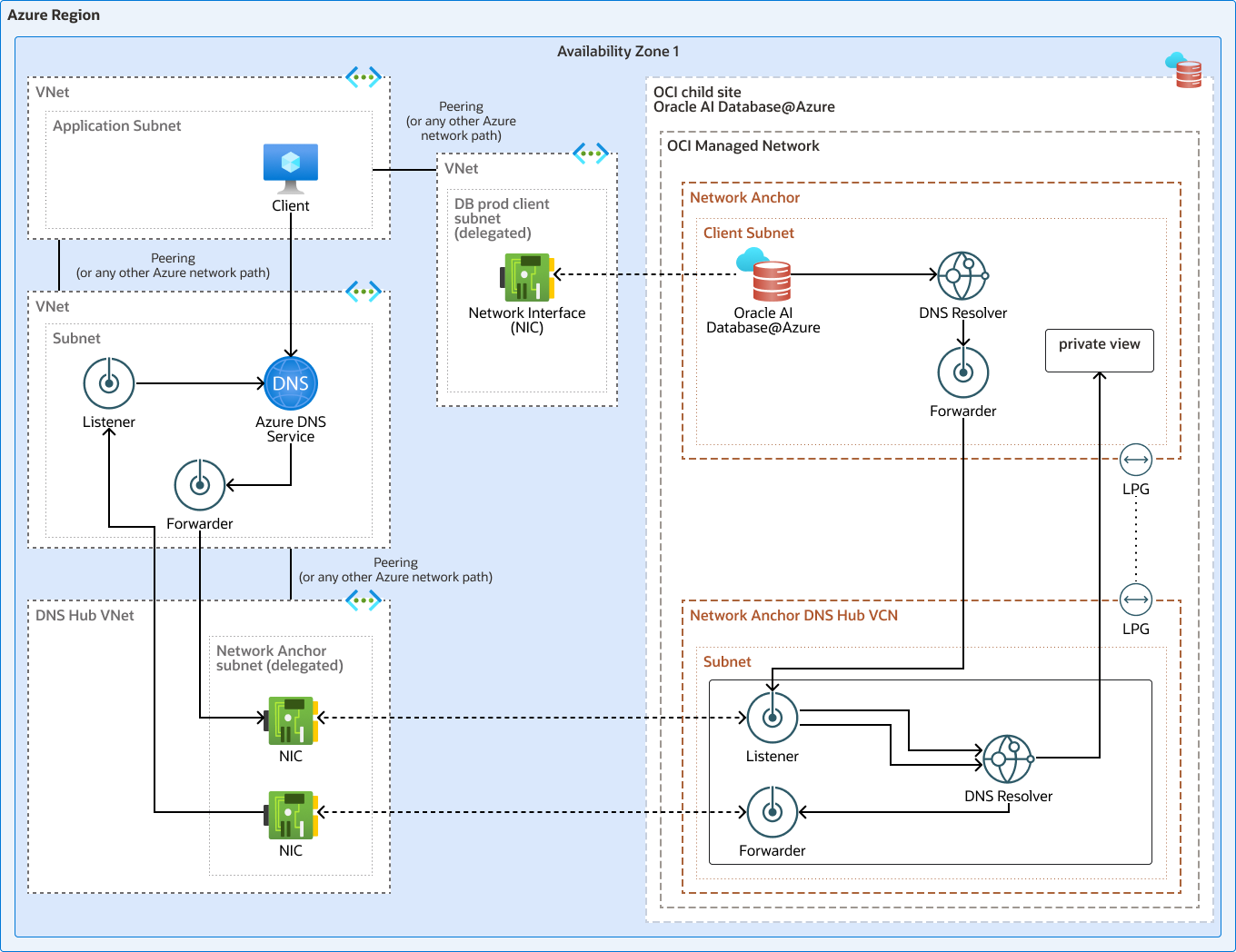
Dedicated DNS hub Network Anchor. The database network and DNS hub network remain separate. Private connectivity and DNS resolver rules provide the resolution path between them.
For queries from a database resource to Azure or an on-premises network, the resolver in the database network forwards the selected domains to a listening endpoint in the DNS hub network. The DNS hub resolver then applies its forwarding rules and sends the queries through the Network Anchor forwarding endpoint to Azure DNS Private Resolver or another customer DNS service.
For queries from Azure or an on-premises network to a database resource, customer DNS forwards the database domain to the DNS hub listening endpoint. The DNS hub resolver then resolves the query from its private zones.
To resolve database domains hosted in other database VCNs, associate their private views with the DNS hub resolver. An attached private view makes its private zones available to the hub resolver without copying the DNS records. A private view can contain multiple zones and can be associated with multiple resolvers. Attach the private views that contain every database domain the hub must resolve. Azure and on-premises clients can then use the hub listening endpoint as the resolution path for those domains.
If a private view isn't attached to the hub resolver, configure a forwarding rule for the specific database domain that targets a reachable listening endpoint in the database network. This alternative requires private connectivity, routes, and security rules between the DNS hub and database networks. A database resource that doesn't support Network Anchors might require customer-managed OCI resolver endpoints and rules for this path.
The DNS hub design must meet these requirements:
- Configure supported private connectivity between each database network and the DNS hub network.
- Configure OCI route tables in both networks so that DNS traffic reaches the resolver endpoints through the private network path.
- On the database network forwarding endpoint OCI NSG, allow outbound UDP and TCP port 53 to the DNS hub listening endpoint. On the DNS hub listening endpoint OCI NSG, allow the corresponding inbound traffic from the database network forwarding endpoint.
- For every domain sent to the DNS hub, its resolver must have an attached private view containing the zone or a forwarding rule to a resolver that can answer for it.
- If the DNS hub resolves database domains for Azure clients, it must have access to all records for each domain through its attached private views or forward each distinct database domain to the resolver endpoint that serves it.
Verify DNS Resolution
Verify DNS resolution in each required query direction.
Run checks in each required query direction:
- Obtain the service FQDN from the database or resource connection details.
-
Run
nslookup <service-fqdn>from that client and confirm that the answer is the expected private IP address. - If Oracle AI Database@Azure resources must resolve Azure or on-premises names, run the service-appropriate lookup from the resource and confirm that the answer is the expected private IP address.
- If resolution fails, inspect the source's DNS server, the relevant private zone or forwarding rule, VNet link, and access to the resolver endpoint.
- If the name resolves but the connection fails, inspect routing, security rules, and the database listener or service port separately.