File Storage
OCI File Storage provides scalable network file systems with NFSv3 access, snapshots, and encryption at rest. The File Storage subject areas enable analysis of exports and mount targets alongside file systems and replications. Teams can review resource lifecycle states and placement, inspect export paths and subnet associations, review file system snapshot policy identifiers and quota settings, and trace replication source and target file systems.
The four fact measures retain Version Count in their displayed names and count stored fact records. Resource Analytics ingestion updates existing resource records. These measures don't represent retained change history or historical snapshots. Detailed attributes provide storage, throughput, and replication status context.
Business Questions
The subject area can answer the following business questions:
- Which exports expose each file system, and what paths and export set IDs do they use?
- Which subnets and availability domains host mount targets?
- What are each mount target's billed and requested read-throughput settings, in Gbps?
- Which file systems reference snapshot policy IDs, and are quota rules enabled?
- What metered bytes and clone counts are reported for each file system?
- Which file systems are the sources and targets of replications, and what are their regions?
- What replication delta status, progress, and recovery point time are reported?
Observed Throughput is the mount target's current billed read-throughput setting, in Gbps. Requested Throughput is the requested read-throughput setting, also in Gbps. The settings can differ during a pending downgrade. They don't measure application traffic. See Managing Mount Targets.
Logical Model
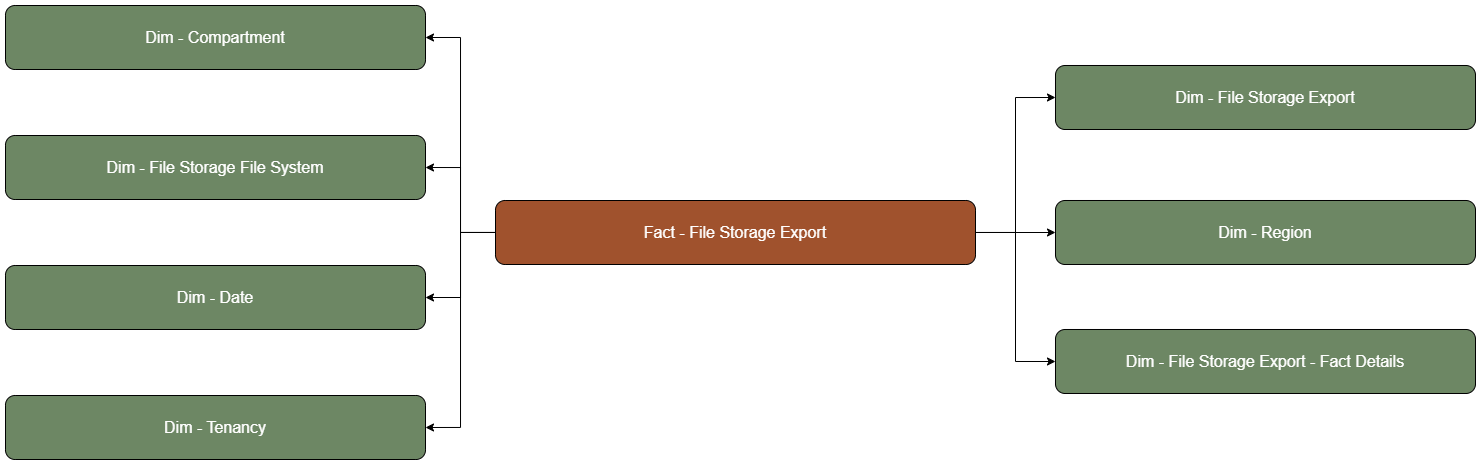
File Storage Exports and Mount Targets centers on Fact - File Storage Export and Fact - File Storage Mount Target. Exports relate to file systems; mount targets relate to VCN subnets and availability domains. File Storage File Systems and Replications centers on Fact - File Storage File System and Fact - File Storage Replication. Replications relate to source and target file systems. Both subject areas include compartment, tenancy, region, date, and resource fact details.
A replication's source and target file systems are optional relationships in the logical model, using left outer joins. Missing related details don't mean that the primary resource is absent. Export-to-file-system and mount-target-to-subnet relationships are also optional. Filtering on an optional related field can exclude records without that detail.
The diagram contains one tab for each fact. Use the diagram's page selector to view its relationships.
Metric Details
The Date folder filters each fact record's stored Time Key, assigned from the source-event hour when the fact is first inserted and retained when it's updated. Date filters don't provide historical inventory as of a selected date. For creation-period analysis, filter Time Created in the relevant File Storage Export Details, File Storage Mount Target Details, File Storage File System Details, or File Storage Replication Details folder. To filter the source-event time reflected by the stored fact, use Time Updated in the matching Fact Details folder listed in the logical-model table above. These filters don't reconstruct previous resource states.
The following metrics are exposed in the presentation fact folders. Count measures count stored fact records selected by the report filters, using the fact key. They don't calculate distinct resource IDs.
| Fact Folder | Metric | Definition |
|---|---|---|
| Fact - File Storage Export | File Storage Export Version Count | Number of stored export fact records selected by the report filters, calculated as COUNT of the fact key. The displayed Version Count name does not indicate retained version history. |
| Fact - File Storage Mount Target | File Storage Mount Target Version Count | Number of stored mount-target fact records selected by the report filters, calculated as COUNT of the fact key. The displayed Version Count name doesn't indicate retained version history. |
| Fact - File Storage File System | File Storage File System Version Count | Number of stored file-system fact records selected by the report filters, calculated as COUNT of the fact key. The displayed Version Count name doesn't indicate retained version history. |
| Fact - File Storage Replication | File Storage Replication Version Count | Number of stored replication fact records selected by the report filters, calculated as COUNT of the fact key. The displayed Version Count name doesn't indicate retained version history. |